 Accent marks, diacritics and other special characters, right where they should be...
at your fingertips!
keyxpat is the first software that solves in a new and efficient way this famous problem under Windows:
“how to type a specific language's diacritics on a US qwerty or foreign keyboard?”

How it works
keyxpat is really simple, but it had to be invented. This utility associates a key with a series of characters. To get a particular one in the series, you just have to keep on pressing the key and release it after a certain (short) amount of time. Let's look at an example:
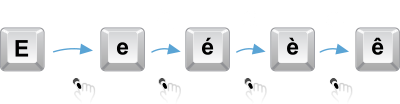
If you hit the E key and release it right away, you get an "e" as usual. Keep it pressed a little longer and you get an "é". A little more and it becomes an "è" and then, an "ê". This serie ends with an "ë".
The waiting time between each character depends on your typing speed. It is configurable and is measured in milliseconds. 350ms is the default value. It's up to you to decide which speed suits you best.
Since you don't have a timer in your head, keyxpat helps you determine when to release a key thanks to a subtle metronome (whose volume is also configurable) that chimes out small ticks. Release the key as soon as you hear the requested number of ticks. Don't worry. With a little practice, you'll be able to turn off the metronome, so natural does Keyxpat feel.
All supported keys and characters are configurable in a graphical user interface. You can create missing languages, add characters you use often or remove them.
